Why someone with a small bit of tech savvy won’t use Windows or Mac…
Today you probably have a few devices in your life, right? Laptop, maybe tablet, and a phone. Plus your home TVs. What does your computer/online life look like in fact? Let’s do a quick inventory by provider. This is personal by the way, I am not talking about a daily work scenario, just what you might do on any given day off.
Desktop Usage
Assuming you are on windows, you use one or more screens, and each screen may have multiple windows open. Or you have programs running in the background that you might use at a moment’s notice. As I look at mine, I will use my own view for a minute to break down what I have running in the background.
1. Password Manager
2. Tool Bar Manager (for multi-monitor)
3. Four different storage sync tools for OneDrive, Google Drive, iCloud Drive, and DropBox
4. Anti-Virus/Malware software, two separate apps
5. A System Performance Management Module
6. A Battery Management tool, plus Sound, Bluetooth, and Wi-Fi
7. A Chat/Call App
8. A note taking app, screen clipping app, and a phone sync app
9. A device driver for buttons
10. 3 AI apps, one local, two remote.
That is all just what is running in the background. All collecting telemetry, and all just taking up memory and processing power. On the “windows open front, I have:
1. This browser window I am typing an article into
2. My email inbox, a google search, another article I intend to read, a dashboard screen with launch links, and my connectivity window for the internet. (I am writing this while on a cruise, so you have to maintain connectivity by periodically refreshing the connection.)
3. I have a PowerShell window open so I could start a few AI agents if I want.
All in all, what am I really doing?
Communication windows for others to connect to me, writing, and contemplating working with an AI agent. In the end, what do I really need? The article writing screen, a search/AI prompt to do research, and something to keep time, so I don’t miss any shipboard activities.
It is really minimal what I do “simultaneously”, and while the idea of “multi-tasking” sounds quaintly productive, it is far from what my day will include today.
The vast majority of the programs on my laptop are in anticipation of my efforts. But if I actually had a tool on my computer that tracked specifically what I used and optimized for it, I would probably reduce my usage footprint down to a bare minimum of apps. As a matter of fact, for most days, I can do all I need to do on a phone or tablet.
Content Creation Use Cases
So today, I am only writing. But other days, I write, build products in my fantasy of being a vibe coder, and I create videos because sometimes I think I have something to say worth sharing. Other days I may be tracking finances, communicating with folks I care about, and slogging through the absolutely abysmal flood of junk mail.
When I am in “creator mode” be it writing, videos, or code work, I am focused 100% on the process at hand. I cannot write while doing a video, nor can I plan a product build while writing my “hot take on AI” in an article. Real acts of creation take a lot more effort and focus than faffing around with ten browser windows, or having 10 “at the ready” apps to do something that I seldom need.
But I do appreciate having the “at the ready” tools. So if I am struggling with something, I might record a video clip to remember things later, or snag an image to explain or explore an issue. These at the ready functions are very worthwhile, but again, I think I could minimize them to a bare minimum and feel no concern over my productivity.
The number one thing I want that I think a number of creatives want, is the “instant on” capability. If I have a moment that strikes, my creativity shouldn’t be hampered by “open this app, set up a new file or project, check the mike, and record”. It should be “record” just that and only that.
This is where tablets and mobile devices are far superior to computers in general. Having the instant on capability, and the ability to funnel that instant on camera directly to my editing queue for a quieter time when I review works.
AI’s Next Iteration
All of these scenarios work well today, but you have to have apps in place, or OS tools in place. I feel that Pewdiepie’s example of his “Odysseus Workspace” we have a new thing to aspire to on this front.
Knowing I can have a centralized hub for everything, and be able to hop into it with a voice prompt in a moment’s notice is brilliant. I will want it on my mobiles as well as my computer, but it is where I want to go.
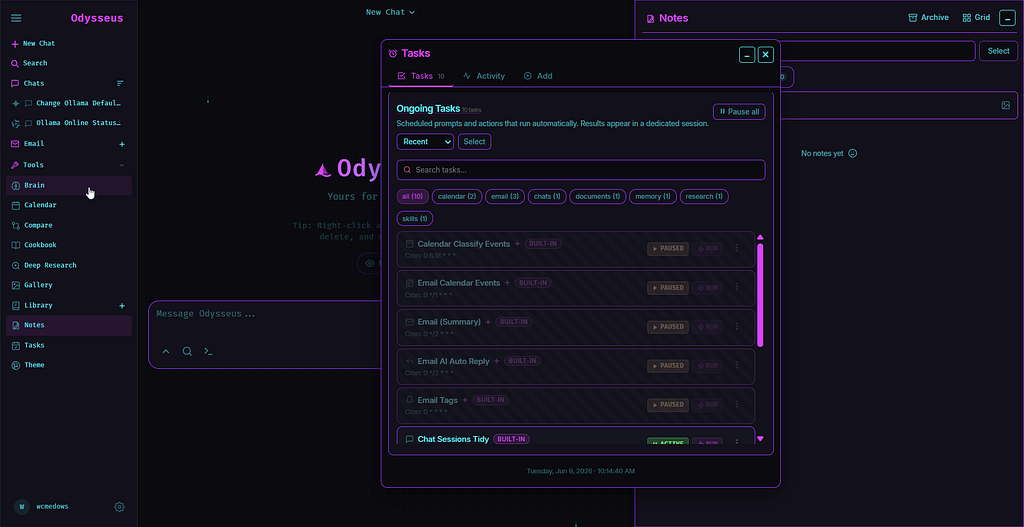
This is his tool, and it is a swiss army knife with more tooling than future iterations will require. But it is such a great start. I can imagine a super streamlined version of this interface with simple tools that do very complex things. When I can get this running on a tablet with instant on, and zero friction to input, I sense that the world of computers and apps will be minimized to back end compute.